SEO for beginners: how Google actually decides which page ranks
Forget the jargon for a minute. Google does three jobs: it finds pages, it works out what they are about, and it picks the most useful one for each search. Here is how each step works and where small sites usually trip up.
Most people meet SEO through a sales call. Someone promises "page one in 30 days", throws around words like backlinks and domain authority, and you come away thinking search engines are a black box that only specialists can open.
They aren't. Google publishes a surprising amount about how it works, and once you see the three jobs it does, almost every SEO decision becomes common sense. This guide walks through those three jobs, then gives you the short list of things that matter most for a small website.
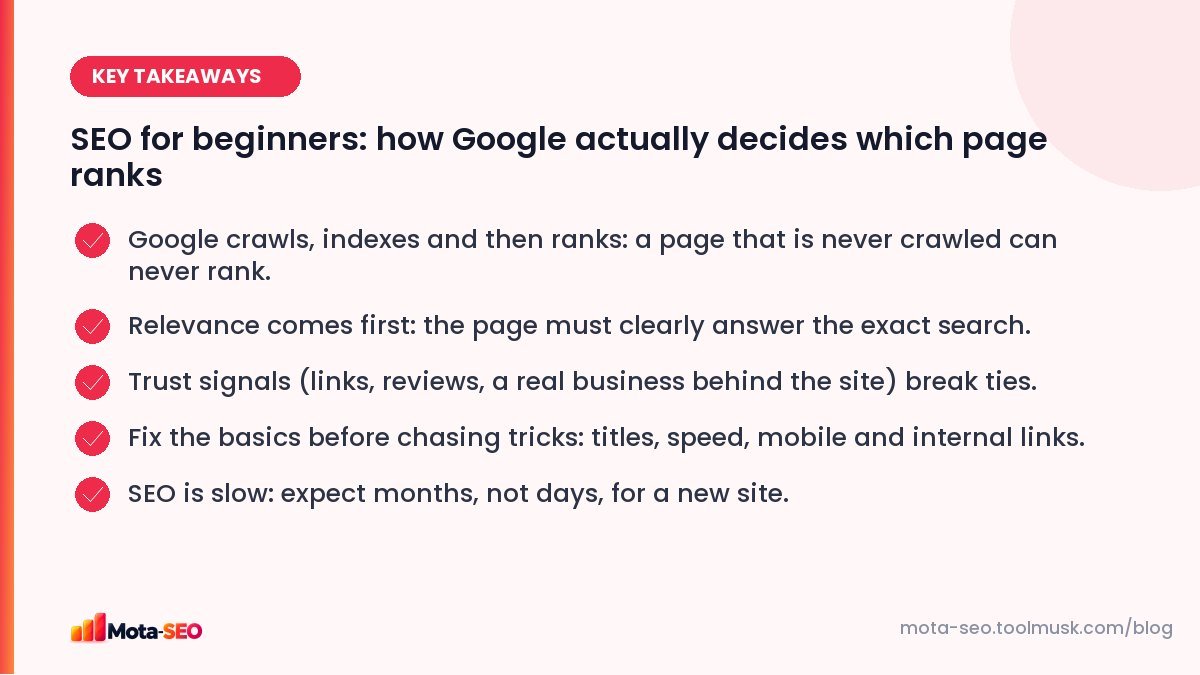
Key takeaways from this guide
Job one: finding your pages (crawling)
Google runs a huge fleet of programs, usually called Googlebot, that download pages from the web. It discovers new pages mainly by following links from pages it already knows, and from the XML sitemaps that site owners submit.
That has a direct consequence: a page with no links pointing to it is close to invisible. It's one of the most common problems on small business sites. The owner adds a new service page, forgets to link it from the menu or any other page, and wonders months later why it never shows up.
A few things can stop crawling altogether:
- A
Disallowrule in robots.txt that blocks the folder (very common after a site moves from a staging server). - The page only loading after a login, or only through a search box.
- Links built with JavaScript click handlers instead of real
<a href>tags. - A server that is slow or returns errors, so Google backs off.
You can check the first one in seconds with our robots.txt tester, and see whether your sitemap is valid with the sitemap checker.
Job two: understanding them (indexing)
After downloading a page, Google renders it (runs the JavaScript, like a browser would), reads the text, the title, the headings, the images and their alt text, and the structured data. It then decides whether the page is worth keeping in its index, the giant database it searches when you type a query.
Not every crawled page gets indexed. Google skips pages that are:
- marked
noindex(sometimes by accident, through a WordPress setting), - near-duplicates of another page, in which case it keeps only the one it treats as the canonical,
- thin, meaning there's very little original content on them,
- returning an error code instead of a normal 200 response.
The "Pages" report in Google Search Console tells you exactly which URLs were left out and why. If you haven't set Search Console up yet, our guide to the Search Console reports that matter takes about twenty minutes to follow.
Job three: picking the best answer (ranking)
When someone searches, Google pulls every indexed page that could be relevant and orders them. It uses hundreds of signals, but they group into a handful of questions:
| Question Google asks | What it looks at |
|---|---|
| Does this page match what the person wants? | The words on the page, the title, headings, and whether the type of page fits (a shop page for "buy", a guide for "how to"). |
| Is it genuinely useful? | Depth, original information, clear answers, whether people seem satisfied. |
| Can it be trusted? | Links from other sites, the reputation of the business, who wrote it, reviews. |
| Is it a good page to land on? | Works on mobile, loads quickly, no aggressive pop-ups, HTTPS. |
| Does context change the answer? | The searcher's location and language, how recent the content needs to be. |
Relevance is the gatekeeper. A perfectly fast, well-linked page about "wedding photography" will never rank for "birthday photographer in Indore" if it never mentions birthdays or Indore. Trust and page experience mostly decide the order among pages that are already relevant.
What "search intent" means, with an example
Search for best running shoes and you'll see comparison articles. Search for running shoes size 9 and you'll see shop category pages. Same topic, different intent. Google learned from billions of searches what kind of page people want for each phrasing, and it rarely ranks the wrong type.
So before writing any page, type your target phrase into Google and look at the top five results. If they're all lists and guides, a product page won't break in, however well optimised. We go deeper on this in our search intent guide.
The five fixes that matter most for a small site
If you run a small business site, a portfolio or a blog, these give the biggest return for the least effort. Do them in this order.
1. Give every important page a clear, unique title
The title tag is still the strongest on-page hint you control. Put the main phrase near the start, keep it around 50–60 characters, and make it read like something a person would click. "Home" or "Services | Company Name" wastes it. Our meta title guide has examples for different page types.
2. Make sure Google can reach and index everything you care about
Submit a sitemap, check robots.txt isn't blocking anything important, and look for accidental noindex tags. Run your homepage through our free SEO audit to catch the obvious problems in one go.
3. Link your pages to each other
Every page you want to rank should be reachable within a couple of clicks from the homepage, with link text that describes where it goes. "Click here" tells Google nothing; "our GST registration service" tells it plenty.
4. Make the mobile version good
Google now crawls and indexes sites using a smartphone crawler, so the mobile version of your page is your page as far as ranking goes. Text must be readable without zooming and buttons must be easy to tap. Test any URL with the mobile-friendly checker.
Our mobile-first indexing checklist lists everything to check.
5. Answer the question better than the current results
This is the part no tool can do for you. Look at what ranks now, then write something more complete, more specific or more up to date. Add your own photos, prices, real examples from your work. That original material is exactly what generic competitors can't copy.
Things that matter less than people think
A lot of beginner energy goes into things that barely move rankings:
- Meta keywords tag. Google has ignored it for well over a decade.
- Exact keyword density. There is no magic percentage. Write naturally; use the phrase where it fits.
- Submitting your site to hundreds of directories. Low-quality directory links are ignored at best.
- Daily tiny edits. Changing a page every day doesn't signal freshness; real updates do.
How long until you see results?
For a brand-new domain, plan on three to six months before traffic is meaningful, and longer in competitive niches. An established site fixing technical problems can see changes within weeks, as soon as Google recrawls the fixed pages. We've written a whole piece on realistic SEO timelines if you need to set expectations with a client or a boss.
Where to start today
Pick your five most important pages. For each one, check that it is indexed (search site:yourdomain.com/page-url in Google), that it has a unique, descriptive title, and that at least two other pages on your site link to it. That one-hour exercise fixes more real problems than many paid "SEO packages" do.
Frequently asked questions
Can I do SEO myself without hiring anyone?
Yes, for most small sites. The basics, clear titles, good content, a sitemap, internal links and a fast mobile site, need time more than expertise. Hire help when you hit technical problems or very competitive keywords.
Does paying for Google Ads improve organic rankings?
No. Google keeps ads and organic results separate. Ads can bring traffic and data about which keywords convert, but they do not change where your pages rank organically.
How often does Google crawl my website?
It depends on how often your site changes and how important Google thinks it is. Popular news sites are crawled constantly; a small business site might see important pages recrawled every few days and minor pages every few weeks.
What is the single most important SEO factor?
Relevance to the search. A page has to match what the person is looking for before anything else counts. After that, content quality and trust (mainly links and reputation) decide the order.

Written by the Mota-SEO team
We build free SEO and website tools. Our guides are practical, written for small teams, and checked against Google's own documentation.
Comments 0