How to write a meta title that ranks and gets clicked
The title tag is still the strongest on-page hint you control, and it is the first thing searchers read. Here is how long it should be, where the keyword goes, and real before-and-after examples for every type of page.
The meta title, or title tag, is the line of blue text in a Google result. It's also the text in the browser tab and the default headline when someone shares your link. It has two jobs that sometimes pull in different directions: tell Google what the page is about, and convince a person to click.
Good titles manage both. Here's how.
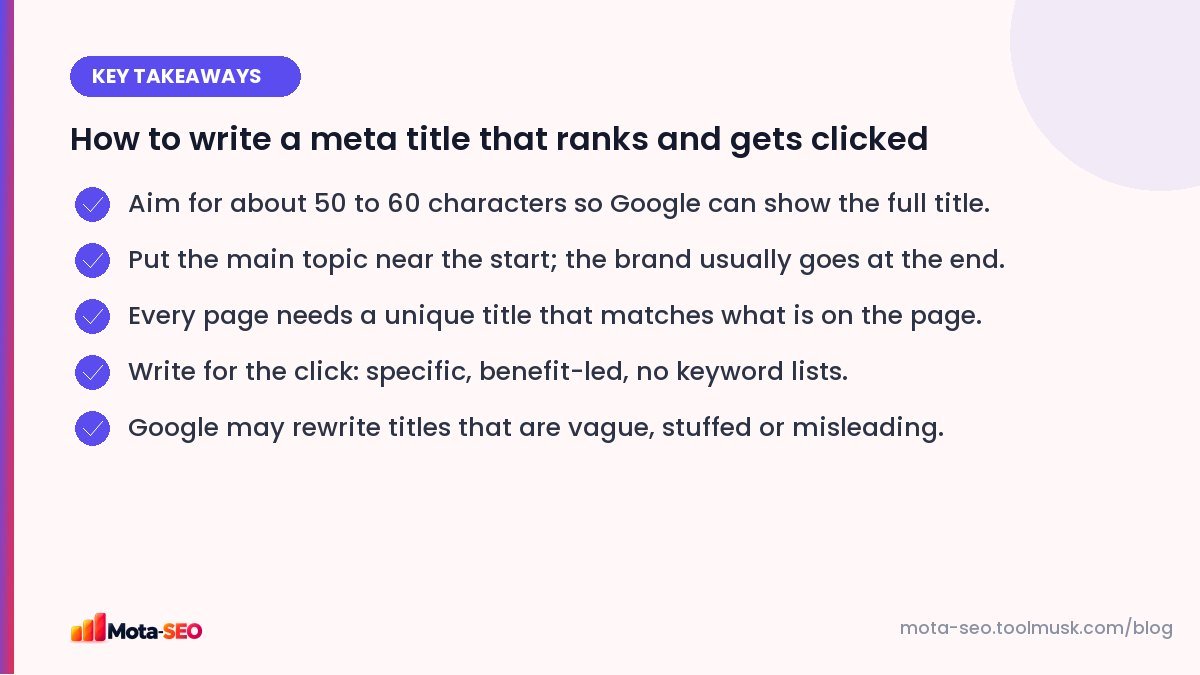
Key takeaways from this guide
What the title tag looks like
In your page's HTML it sits inside the <head>:
<title>Root Canal Treatment in Pune – Cost & Recovery | SmileCare Dental</title>In most website builders and in WordPress SEO plugins it's a field called "SEO title" or "Meta title". If you leave it empty, the CMS usually falls back to the page heading plus the site name.
How long should a meta title be?
Google truncates titles by pixel width, not characters: roughly 580–600 pixels on desktop. In practice that's about 50–60 characters. Wide letters (W, M) use more space than narrow ones (i, l), so treat 60 as a guide, not a hard rule.
Longer titles aren't penalised; they just get cut off with "…", and the part people see may not be the part that convinces them. Put the important words first. You can see exactly how a title will look with our SERP snippet preview.
Seven rules that cover 90% of cases
- One unique title per page. Duplicate titles make pages compete with each other.
- Main topic near the start. "Leather Wallets for Men | Brand" rather than "Brand | Shop | Men | Leather Wallets".
- Match the page. If the title promises prices, show prices. Mismatches hurt clicks and Google may rewrite the title.
- Add a reason to click. A number, a year if content is time-sensitive, a benefit, or what makes yours different.
- Brand at the end, separated by | or –. Lead with the brand only on the homepage or if it's very well known.
- No keyword lists. "Cheap Hotels, Budget Hotels, Hotels Near Me" reads like spam and gets rewritten.
- Write it like a headline, not a filing label.
Before and after: real-world examples
| Page | Before | After |
|---|---|---|
| Homepage, local business | Home | Physiotherapy Clinic in Indiranagar, Bangalore | MoveWell |
| Service page | Services – ABC Consultants | GST Registration for Startups (3-Day Process) | ABC Consultants |
| Product category | Shop | Products | Shoes | Running Shoes for Men – 120+ Styles, Free Returns | StrideCo |
| Product page | Product 4521 | Sony WH-1000XM5 Wireless Headphones (Black) – Price & Specs |
| Blog guide | Blog post about SEO tips | How to Do an SEO Audit in One Afternoon (Free Tools Only) |
| Comparison | Hosting | Shared vs VPS Hosting: Which Should a Small Business Choose? |
| Local + intent | Wedding Photography | Wedding Photographer in Jaipur – Packages from ₹45,000 |
| Tool page | Checker | Free SSL Checker – Test Any Certificate in Seconds |
Notice what the "after" versions have in common: they say what the page is, for whom or where, and include one concrete detail (a timeframe, a number, a price) that makes the result stand out.
Keywords in titles: how much is enough?
Use your main phrase once, naturally, near the start. Close variations and synonyms are fine; Google understands that "physio" and "physiotherapy" are related. Repeating the keyword twice doesn't help and makes the title worse for people.
If you're not sure which phrase to target, check which searches already bring impressions to the page in Search Console, or do some quick free keyword research.
Why Google sometimes changes your title
Google can show a different title from the one you wrote, often taken from your H1 or other prominent text. It tends to happen when the title is:
- missing, or the same on many pages,
- very long, or stuffed with keywords,
- a poor description of the page ("Home", "Untitled"),
- out of date compared with the content.
The fix is usually to make the title and the H1 agree and describe the page accurately. It also helps to keep the most important text in a visible H1; check yours with the heading checker.
Title vs H1: should they be the same?
They should be about the same thing, but they don't have to be identical. A common pattern: the H1 is the full, natural headline readers see on the page ("How to do an SEO audit in one afternoon"), and the title tag is a tighter version with the brand ("SEO Audit in One Afternoon: Free Checklist | Mota-SEO").
Testing and improving titles
In Search Console, find pages with lots of impressions but a lower click-through rate than similar pages. Rewrite one title at a time, note the date, and compare CTR after four weeks at a similar average position. Small changes, adding a number, a price or "free" where true, can lift clicks noticeably without any change in ranking.
When you have dozens of pages to write titles for, our meta title generator gives you starting points, and the meta tags checker confirms what's actually live on each page.
Frequently asked questions
What is the ideal meta title length?
About 50 to 60 characters, which fits within the roughly 600 pixels Google shows on desktop. Longer titles are allowed but get cut off.
Should I put my brand name in the title?
Usually yes, at the end, separated by a dash or a pipe. On the homepage, or for a very well-known brand, it can go first.
Is the meta title a ranking factor?
Yes, it is one of the clearest on-page signals of what a page is about, and it strongly influences whether people click on your result.
Why is Google showing a different title for my page?
Google rewrites titles it considers inaccurate, too long, stuffed with keywords or duplicated. Making the title match the H1 and describe the page clearly usually stops it.

Written by the Mota-SEO team
We build free SEO and website tools. Our guides are practical, written for small teams, and checked against Google's own documentation.
Comments 0