Changing domain or platform without losing your rankings
Migrations are where sites lose the most traffic, almost always because of the same few mistakes. Here is the process we follow for domain changes, platform moves and redesigns, from URL mapping to the first month after launch.
A website migration is any big change that affects URLs or how Google sees the site: a new domain, a new platform (WordPress to Shopify, custom PHP to Laravel), a redesign with new URLs, or moving to https. Done carefully, traffic dips a little and recovers within weeks. Done carelessly, sites lose half their organic traffic for months.
The difference is almost entirely in preparation.
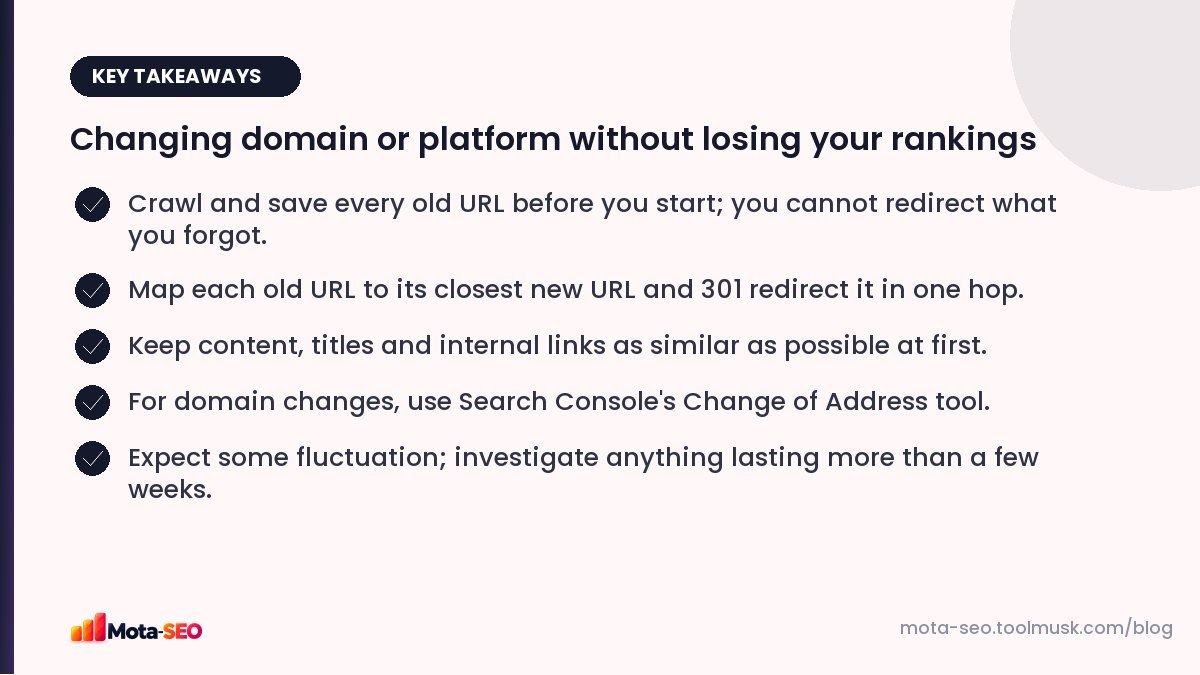
Key takeaways from this guide
Phase 1: Inventory (before anything changes)
List every URL that matters
Collect old URLs from several sources, because each one misses some:
- the current XML sitemap,
- Search Console → Performance → Pages (export, last 16 months),
- analytics landing pages,
- a crawl of the site,
- pages with backlinks from other sites.
Combine them into one spreadsheet and remove duplicates.
Benchmark
Record current organic traffic, top landing pages, rankings for your important keywords, and Search Console clicks. You'll need these to know whether the migration worked.
Save the old site
Keep a copy of the old content, titles and meta descriptions. Our meta tags checker can record the current tags of key pages before they change.
Phase 2: Map and build
Map old URLs to new ones
Add a "new URL" column to the spreadsheet. Every old URL should map to the closest equivalent new page. Rules:
- one-to-one where the page still exists,
- the most relevant new page where pages are merged,
- a 404 or 410 only for content that's gone with nothing related, and that had no traffic or links,
- never "everything to the homepage".
Keep what works
Resist changing everything at once. If possible, migrate first with the same content, titles, headings and internal links, then improve afterwards. If traffic drops, you'll know whether the move or the new content caused it.
Build redirects
Implement the map as 301 redirects. On Apache, our .htaccess redirect generator turns a list of old and new URLs into rules. Make sure redirects go straight to the final URL: no chains through intermediate versions. Our redirects guide explains why.
Prepare the new site properly
- Staging behind a password, not just robots.txt.
- Canonicals, hreflang, structured data and the sitemap all use the new URLs.
- Internal links point to new URLs directly.
- Analytics and Search Console ready for the new domain or property.
Phase 3: Launch day
- Remove staging blocks: robots.txt
Disallow: /and noindex tags. Check with the robots.txt tester. - Switch DNS or deploy. For DNS changes, lower the TTL a day earlier (see our DNS guide).
- Test a sample of old URLs, at least your top 50, with the redirect checker: one 301 hop, correct destination, 200 at the end.
- Submit the new sitemap in Search Console.
- Domain change only: verify both old and new domains in Search Console and use the Change of Address tool from the old property.
- Check HTTPS on the new site with the SSL checker.
- Update external profiles you control: Google Business Profile, social bios, directory listings, email signatures.
Phase 4: The first month
- Daily for the first week: Search Console Pages report (new 404s, noindex surprises), server errors, traffic to top pages.
- Weekly: compare clicks and rankings with your benchmark; run a broken link check on key pages.
- Keep the old domain and its redirects for at least a year, ideally forever. Letting the old domain expire throws away every link pointing to it.
What's normal, and what isn't
| Normal | Investigate |
|---|---|
| Some ranking fluctuation for 2–6 weeks | Traffic down more than 20–30% after 6 weeks |
| Old URLs gradually replaced by new ones in results | Old URLs returning 404 instead of redirecting |
| Temporary increase in crawling | New pages "Excluded by noindex" |
| Short-term drop on a few pages | Whole sections missing from the index |
The mistakes that cost the most
- No redirect map, or redirects only for the top pages.
- Staging noindex or robots.txt block copied to production.
- Content removed or heavily cut "to simplify" during the move.
- Letting the old domain expire.
- Changing domain, platform, design and content all in the same week.
A migration is the one SEO project where a spreadsheet and patience genuinely beat clever tactics. Put the time into the URL map; it's what protects the traffic.
Frequently asked questions
Will I lose rankings when I change my domain?
Usually there is a temporary dip of a few weeks while Google processes the move. With complete 301 redirects, the same content and the Change of Address tool, most sites recover.
How long should I keep redirects after a migration?
At least one year, and ideally permanently. Keep the old domain registered so its redirects keep working.
Should I redesign and migrate at the same time?
If you can, do one at a time. Changing everything at once makes it hard to tell what caused any drop in traffic.
Is a platform change a migration even if the domain stays the same?
Yes, if URLs, templates or content change. Treat it with the same URL mapping and redirect process.

Written by the Mota-SEO team
We build free SEO and website tools. Our guides are practical, written for small teams, and checked against Google's own documentation.

Comments 0