Crawl budget: when it matters, and when you can ignore it
Crawl budget is one of the most over-discussed topics in SEO. For most sites it simply is not a problem. Here is how to tell whether it is for yours, and what actually improves crawling when it is.
Crawl budget is the number of URLs Googlebot can and wants to crawl on your site in a given time. If Google doesn't crawl a page, it can't index the latest version of it. That sounds alarming, and a lot of SEO advice treats crawl budget as something every site must optimise.
Google's own documentation is clear that most sites don't need to think about it. Here's how to know whether you're the exception.
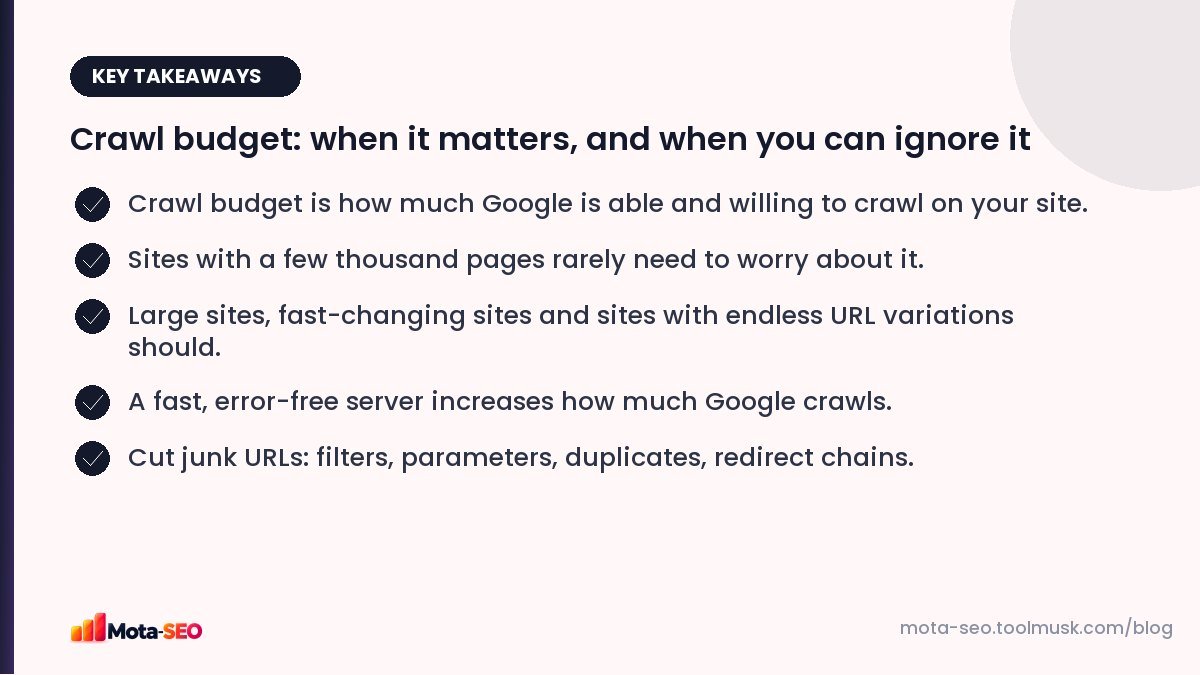
Key takeaways from this guide
The two parts of crawl budget
- Crawl capacity: how much Google can crawl without overloading your server. If your server is fast and returns few errors, Google crawls more. If it slows down or throws 5xx errors, Google backs off.
- Crawl demand: how much Google wants to crawl. Popular pages and pages that change often are crawled more; stale, low-value URLs less.
Who should care
Roughly, according to Google's guidance:
- very large sites (around a million or more unique pages) with content that changes moderately often,
- medium or large sites (tens of thousands of pages and up) whose content changes very frequently, such as daily,
- sites where Search Console shows a big share of URLs as "Discovered – currently not indexed".
If your site has a few hundred or a few thousand pages, and new pages get indexed within days, crawl budget isn't your problem. If pages aren't indexed, the cause is more likely quality, duplication or weak internal linking.
How to check: Crawl stats
In Search Console, go to Settings → Crawl stats. You'll see:
- total crawl requests per day,
- average response time,
- responses by status code (200, 301, 404, 5xx),
- requests by file type and by purpose (discovery vs refresh),
- host status: whether Google had trouble reaching robots.txt, DNS or the server.
Warning signs: response time climbing above several hundred milliseconds, a growing share of 5xx errors, or a large share of requests going to redirects and 404s instead of real pages.
What wastes crawling
Infinite URL spaces
Faceted navigation is the classic example: ?color=red&size=9&sort=price&page=4. A category with ten filters can generate millions of combinations. Calendars that link endlessly to next month do the same.
Duplicates
Parameter variations, session IDs in URLs, http and https versions, print versions. See our duplicate content guide.
Redirect chains and soft 404s
Every hop is a separate request. Pages that return 200 but say "not found" waste crawls on non-content.
Slow server responses
If each page takes two seconds to generate, Google can fetch far fewer of them without risking overloading you.
Fixes that actually help
- Make the server faster. Caching, a better hosting plan, fewer database queries. Check response times with the website speed test and in Crawl stats.
- Fix server errors. Find what's causing 5xx responses (plugin errors, memory limits, timeouts).
- Block worthless URL patterns in robots.txt: sort orders, session parameters, internal search. Robots.txt is the right tool here because the goal is to stop crawling. See our robots.txt guide.
- Use canonical tags for valuable duplicates that must stay crawlable.
- Remove redirect chains and update internal links to final URLs.
- Keep sitemaps clean: only indexable, 200-status URLs, with accurate lastmod dates. Check with the sitemap checker.
- Improve internal linking to important pages so Google sees them as worth crawling often.
- Delete or consolidate thin pages that nobody needs. Fewer, better pages are crawled more efficiently.
Myths
- "Noindex saves crawl budget." Not really. Google still has to crawl a page to see the noindex. Over time it crawls noindexed pages less, but robots.txt is the tool for stopping crawling.
- "Nofollow on internal links saves crawl budget." It doesn't reliably, and it can stop important signals flowing.
- "Crawl-delay in robots.txt controls Googlebot." Google ignores crawl-delay.
- "More crawling means higher rankings." Crawling is a prerequisite, not a ranking factor.
For a small site: what to do instead
If your site is small and pages aren't getting indexed, check in this order: Are the pages linked from other pages? Are they in the sitemap? Do they have unique, substantial content? Are they marked noindex or canonicalised elsewhere? Our one-afternoon audit walks through each step.
Frequently asked questions
Do small websites need to worry about crawl budget?
Generally no. Google says crawl budget mainly matters for very large sites or sites whose content changes very frequently. Small sites with indexing problems usually have quality or linking issues instead.
How do I increase my crawl budget?
Make the server fast and reliable, reduce errors, remove duplicate and worthless URLs, fix redirect chains, and link well to important pages.
Does noindex save crawl budget?
Not directly, because Google must crawl a page to see the noindex. To stop crawling of worthless URL patterns, use robots.txt.
Where can I see how Google crawls my site?
In Google Search Console under Settings, Crawl stats, which shows requests per day, response times and status codes.

Written by the Mota-SEO team
We build free SEO and website tools. Our guides are practical, written for small teams, and checked against Google's own documentation.

Comments 0