Robots.txt explained with real examples (and the mistakes that block sites)
Robots.txt is a tiny text file with the power to hide your whole site from Google. Here is how it works, what it cannot do, and copy-ready examples for common setups.
Every website can have a file at /robots.txt that tells crawlers which parts of the site they may visit. It's one of the oldest conventions on the web, now formalised as an internet standard, and Google, Bing and most well-behaved bots respect it.
It's also one of the easiest ways to accidentally wreck your SEO. One line left over from development can block an entire site. Here's how it works and how to use it safely.
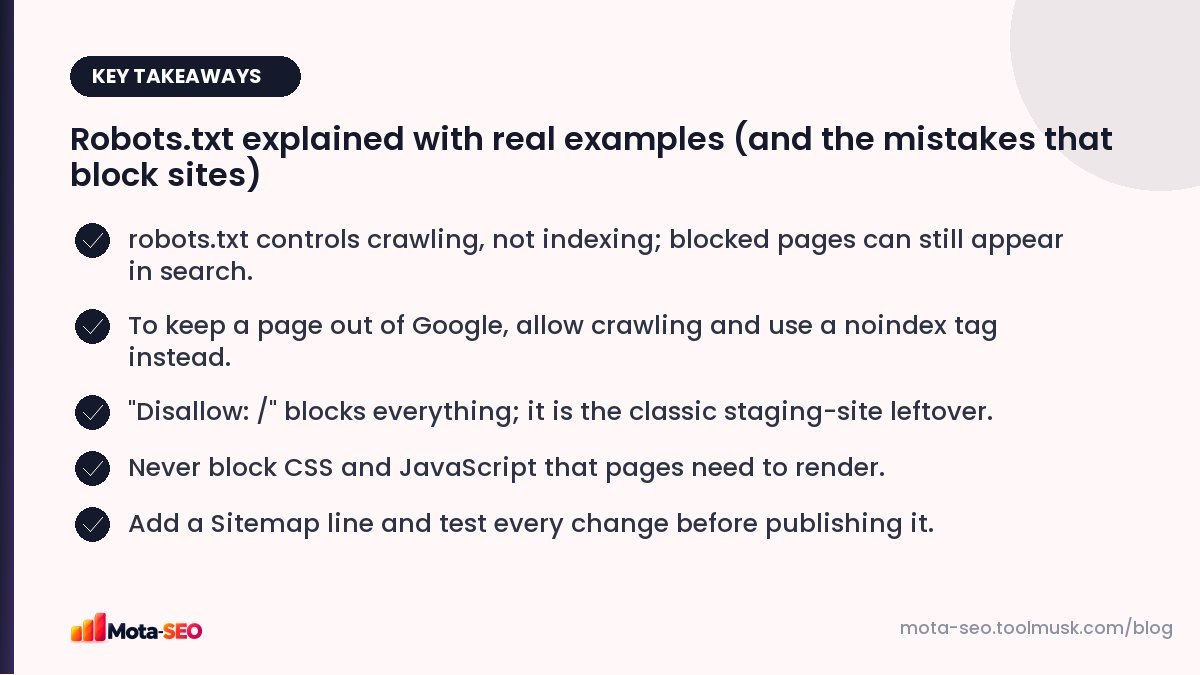
Key takeaways from this guide
What robots.txt does (and doesn't)
Robots.txt controls crawling: whether a bot may download a URL. It does not control indexing: whether that URL can appear in search results.
This distinction trips up a lot of people. If you block a page in robots.txt but other sites link to it, Google can still list the URL in results, often with no description, because it knows the page exists but isn't allowed to read it. And because it can't read the page, it never sees a noindex tag you put on it.
So:
- To keep a page out of search: let it be crawled, and add
<meta name="robots" content="noindex">. - To save crawling effort on huge numbers of useless URLs (filters, internal search): use robots.txt.
- To keep something private: use a password. Robots.txt is public and anyone can read it.
The syntax in five minutes
User-agent: *
Disallow: /admin/
Disallow: /cart
Allow: /admin/help-articles/

Sitemap: https://example.com/sitemap.xml- User-agent: which crawler the group of rules applies to.
*means all. - Disallow: paths that crawler shouldn't fetch. Matching is by prefix:
/cartalso blocks/cart/checkoutand/cartoons. - Allow: an exception inside a disallowed path.
- Sitemap: the full URL of your XML sitemap. Can appear anywhere in the file.
Wildcards
*matches any sequence of characters:Disallow: /*?sort=blocks any URL containing?sort=.$marks the end of the URL:Disallow: /*.pdf$blocks URLs ending in .pdf.
Which rule wins?
Google uses the most specific matching rule, meaning the longest path. If an Allow and a Disallow are equally long, Allow wins. That's why Allow: /admin/help-articles/ overrides Disallow: /admin/ above.
Ready-to-use examples
Allow everything (a perfectly good default)
User-agent: *
Disallow:

Sitemap: https://example.com/sitemap.xml
An empty Disallow means nothing is blocked. Many small sites need nothing more.
WordPress
User-agent: *
Disallow: /wp-admin/
Allow: /wp-admin/admin-ajax.php
Disallow: /?s=
Disallow: /search/

Sitemap: https://example.com/sitemap_index.xml
Online shop with filters
User-agent: *
Disallow: /cart
Disallow: /checkout
Disallow: /account
Disallow: /*?*sort=
Disallow: /*?*price=

Sitemap: https://shop.example.com/sitemap.xml
Be careful with filter rules: if some filtered pages are valuable landing pages (say, "red sarees"), don't block them.
Staging site
User-agent: *
Disallow: /
Fine for staging, a disaster in production. Better still, protect staging with a password so this file never needs to exist.
You don't have to write these by hand; our robots.txt generator builds the file from checkboxes.
The most common mistakes
Disallow: /on the live site, copied from staging. Everything disappears from search over the following weeks.- Blocking CSS and JS (
Disallow: /assets/or/wp-includes/). Google renders pages like a browser; without styles and scripts it may see a broken layout and miss content. - Using robots.txt to remove pages from Google. As explained above, it does the opposite of what you want for already-indexed pages.
- Typos in paths, such as a missing leading slash, or case differences:
/Admin/doesn't match/admin/. - A noindex line in robots.txt. Google stopped supporting it in 2019; it does nothing.
- Blocking the sitemap or important images that you want in Google Images.
How to test before (and after) publishing
Paste your file and a list of important URLs into our robots.txt tester. It shows, for each URL, whether Googlebot is allowed and which rule decided it. Test at least: the homepage, a category or service page, a product or article, a CSS file and a JS file.
Google caches robots.txt for up to about a day, so changes aren't instant. After fixing an accidental block, request indexing for your key pages in Search Console to speed recovery.
What about AI crawlers?
Several AI companies publish user-agent names that respect robots.txt, so you can choose to block them separately from search engines:
User-agent: GPTBot
Disallow: /
That's a business decision about how your content is used. Just make sure you're not blocking Googlebot by accident; that removes you from Google Search. We discuss this more in SEO for AI answers.
A healthy robots.txt checklist
- Returns status 200 at
/robots.txt(a 5xx error can make Google pause crawling). - No
Disallow: /underUser-agent: *on the live site. - CSS, JavaScript and images used by pages are allowed.
- Includes a
Sitemap:line with the full URL. - Blocks only genuinely useless URL patterns.
Frequently asked questions
Does robots.txt stop a page from being indexed?
No. It stops crawling. A blocked URL can still appear in results if other pages link to it. Use a noindex meta tag on a crawlable page to keep it out of the index.
Do I need a robots.txt file?
Not strictly. Without one, crawlers assume everything is allowed. A simple file with a Sitemap line is still good practice.
How long does Google take to see robots.txt changes?
Google usually caches robots.txt for up to about 24 hours, so changes typically take effect within a day.
Can robots.txt hide private pages?
No. The file is public and only polite bots follow it. Protect private areas with a login or password.

Written by the Mota-SEO team
We build free SEO and website tools. Our guides are practical, written for small teams, and checked against Google's own documentation.
Comments 0