How to speed up a slow website: 12 fixes in priority order
Most slow websites are slow for the same few reasons, and the biggest wins are usually the easiest. Here are twelve fixes in the order we would try them, starting with the ones that take minutes.

A slow website costs you twice: visitors leave before it loads, and Google uses real-user speed data as one of its page experience signals. The good news is that most slow sites suffer from the same handful of problems, and the fixes with the biggest impact are often the simplest.
Here are twelve, in the order we'd tackle them.
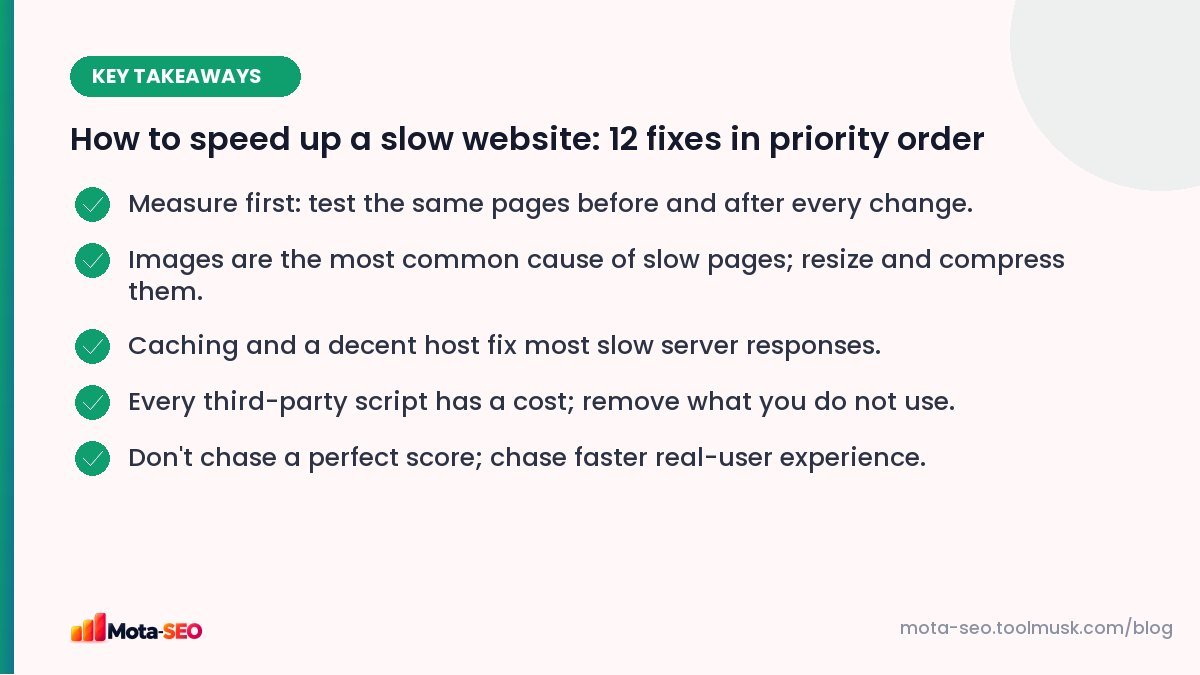
Key takeaways from this guide
Before you start: measure
Pick four or five representative pages: the homepage, a category or service page, a product or article, and your slowest page. Run each through our website speed test and note load time, page weight, number of requests and the largest files. Repeat after each change, so you know what actually helped.
If you have enough traffic, Search Console's Core Web Vitals report shows how real visitors experience the site. Our Core Web Vitals guide explains the metrics.
1. Resize and compress images
This is the biggest win on most slow sites. Common sins: a 4,000-pixel photo displayed at 800 pixels, PNG used for photographs, no compression at all.
- Resize to the largest size the image is actually displayed at (often 1,200–1,600 px wide for full-width images).
- Use WebP or AVIF where possible; JPG at quality 75–85 for photos if not.
- Use responsive images so phones get smaller files.
Our image optimisation guide covers this in depth, and the image resizer does quick resizing in your browser.
2. Turn on page caching
Without caching, a CMS like WordPress builds every page from the database on every visit. Caching stores the finished HTML and serves it instantly. A caching plugin or your host's built-in cache often cuts server response time from over a second to under 200 ms.
3. Fix slow hosting
If your server takes more than about 600 ms to start responding even with caching, the hosting plan may be the bottleneck. Cheap shared plans crammed with hundreds of sites slow down at peak hours. A better plan, or a server located closer to your visitors (an Indian data centre for an Indian audience), can make a dramatic difference.
4. Remove unused plugins and scripts
Every plugin, widget and tag can add CSS and JavaScript to every page. Go through them and ask: do we still use this? Is it worth the weight? Chat widgets, social share bars and old A/B testing tags are frequent offenders.
5. Delay non-essential third-party scripts
Analytics, ad tags, heatmaps and chat widgets don't need to load before the content. Load them with defer or after the page becomes interactive. This improves both loading and responsiveness (INP).
6. Don't lazy-load the top image
Lazy-loading below-the-fold images is great. Lazy-loading the hero image at the top delays your main content (LCP). Make sure the first visible image loads immediately, ideally with fetchpriority="high".
7. Minify and combine CSS and JavaScript
Removing whitespace and comments shrinks files, often by 20–40% before compression. Most caching plugins and build tools do it automatically, or use our CSS minifier and JS minifier. Read whether minification still helps for the details.
8. Enable Gzip or Brotli compression
Text files (HTML, CSS, JS) compress very well. Most servers support Gzip or Brotli; check the content-encoding header with the HTTP headers checker. If it's missing, ask your host or enable it in the server configuration.
9. Set browser caching headers
Static files like images, CSS and fonts rarely change. Long cache lifetimes (Cache-Control: max-age=31536000 for versioned files) mean returning visitors don't download them again.
10. Use fewer web fonts
Each font family and weight is another download. Two families with two or three weights each is plenty for most sites. Host them yourself or preload the main one, and use font-display: swap so text appears immediately.
11. Use a CDN
A content delivery network stores copies of your static files on servers around the world (and within India), so visitors download from somewhere nearby. Useful especially when your audience is spread out, or your host is far away.
12. Reduce page weight and requests
Look at the total: how many megabytes and how many requests does a typical page need? Sliders with ten large images, autoplay videos and huge icon libraries add up. Our page size checker shows the weight of a page, and our page weight guide gives realistic targets.
What not to obsess over
- A perfect 100 score. Scores are a guide. A page that loads in two seconds on a real phone is a fast page.
- Tiny savings on tiny files while a 3 MB image sits at the top.
- Desktop-only results. Test on mobile; that's what most visitors use and what Google indexes.
A realistic plan
Week one: images, caching, plugin clean-up (fixes 1, 2, 4). Week two: scripts, lazy-loading and compression (5, 6, 8). Then measure. For many small sites, those six changes alone halve the load time.
Frequently asked questions
What is a good website load time?
Aim for the main content to appear within about 2.5 seconds on a typical mobile connection, which matches Google's good threshold for Largest Contentful Paint.
What slows down a website the most?
Most often large, unoptimised images, followed by slow hosting without caching and too many third-party scripts.
Does website speed affect SEO?
Yes, through page experience signals like Core Web Vitals, though relevance and content matter more. Speed has a bigger effect on whether visitors stay and convert.
Do I need a CDN for a small website?
Not always. If your host has a data centre near your visitors and you use caching, a CDN adds less. It helps most for audiences spread across regions or countries.

Written by the Mota-SEO team
We build free SEO and website tools. Our guides are practical, written for small teams, and checked against Google's own documentation.

Comments 0